Random Photo Picker: Spin a Wheel of Pictures
Add a few photos, then spin a wheel of pictures or shuffle them as polaroids and draw one. Everything happens on your device, so your photos are never uploaded.
Want suspense instead of a spin? Try the polaroid shuffle
See It in Action
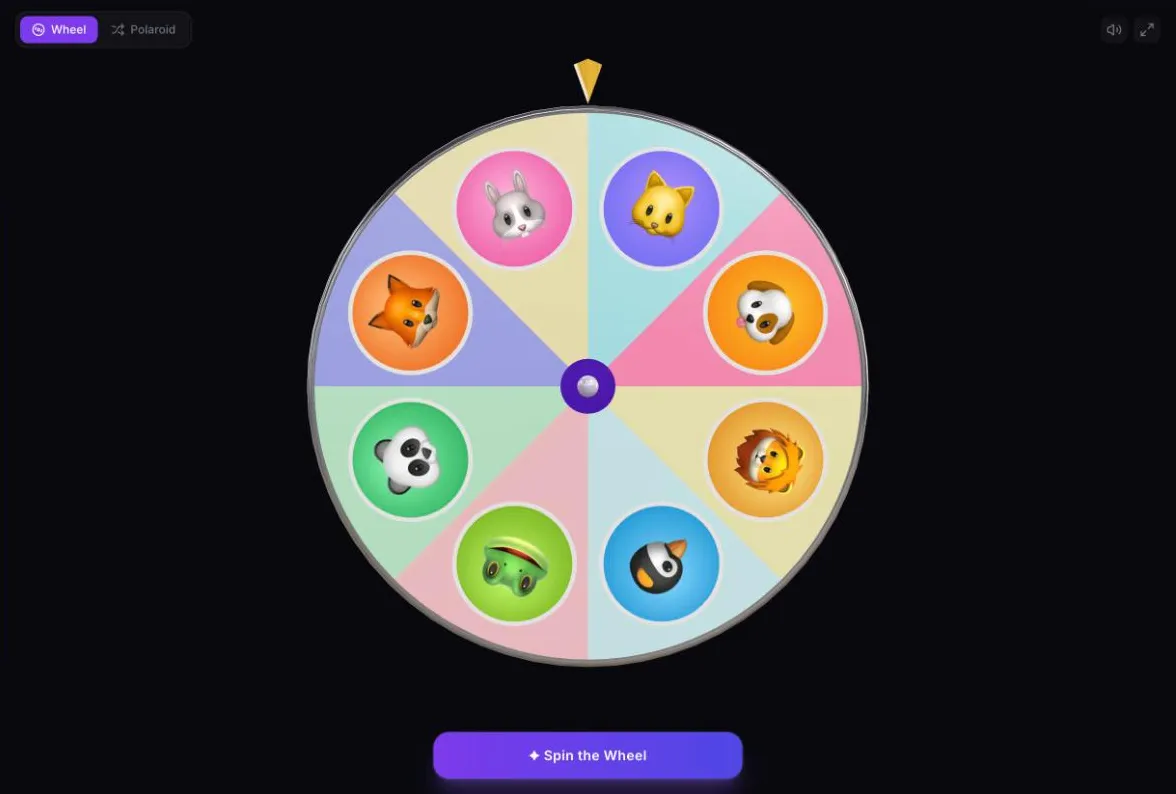
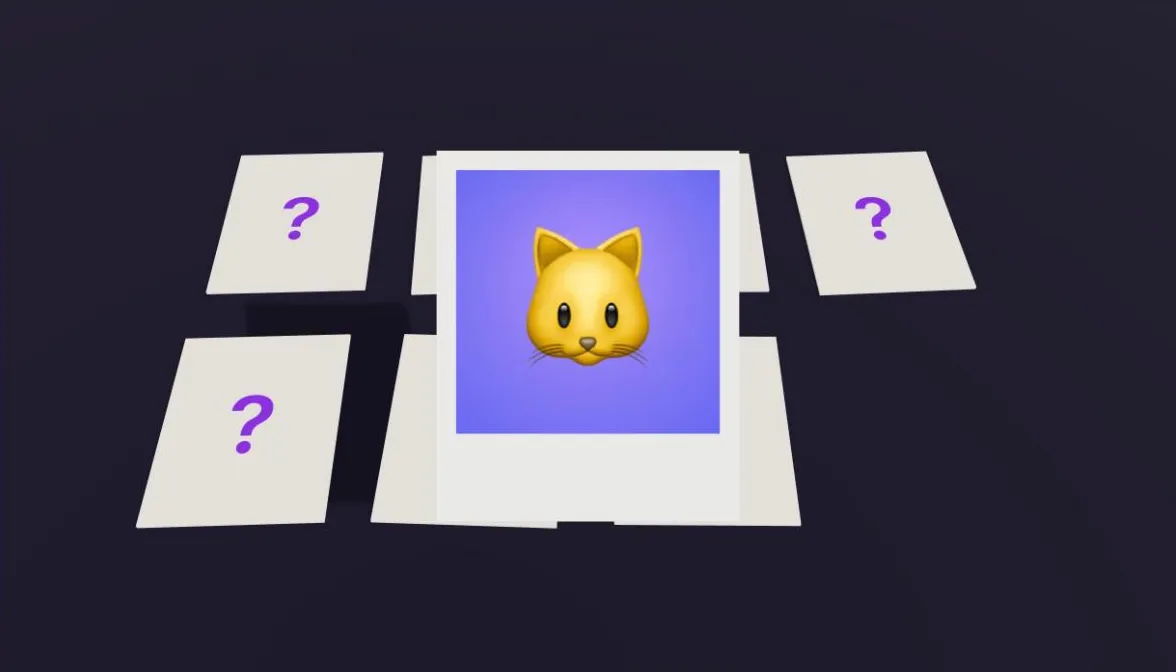

The Photo Picker is a random image picker: it works like a name picker, but with pictures instead of names. Add photos from your phone or computer, choose a style, and let cryptographic randomness pick one. The winning photo is then shown full size, with its name if you gave it one.
There are two ways to draw. The picture wheel is a picture spinner: each photo sits on a segment of a 3D wheel, with a round thumbnail near the rim, and the wheel spins until one lands under the pointer. The polaroid shuffle lays the photos on a table as polaroids, flips them face down, swaps them around like a shell game, and then lifts one up and develops it from gray to full color.
Your photos never leave your device. They are read and shrunk inside your browser, nothing is sent to a server, and they are saved only in your browser so they are still there next time. That makes it safe for class photos, family pictures and anything else you would rather not upload to a website.
The wheel holds up to 24 photos and the polaroid table holds up to 16. A picked photo can be set aside so it is not drawn again, and put back from the tray whenever you like.
How It Works
Simple, fast, and fun
Add your photos
Tap Add photos and pick them from your device, or drag them onto the page on a computer. You can also paste an image you have copied.
Name them if you like
Type a name under any photo. It appears with the winner. Leave it blank and the photo is called Photo 1, Photo 2 and so on.
Choose wheel or polaroid
Switch between the picture wheel and the polaroid shuffle at the top. Your photos stay loaded when you switch.
Draw and reveal
Spin or shuffle, and the winning photo appears full size. Set it aside to leave it out of the next draw, or draw again.
Why Use This Tool
Built for fairness and fun
Nothing is uploaded
Photos are processed in your browser and never sent to a server, not even to save them.
Two ways to draw
A 3D picture wheel with a thumbnail on every segment, or a polaroid shuffle that develops the winner in front of you.
Cryptographically fair
The winner is chosen with the Web Crypto API, so every photo in the draw has exactly the same chance.
Set aside and put back
Take a picked photo out of the next draw so everyone gets a turn, then put photos back one at a time or all at once.
Saved on your device
Your photos, their names and which ones are set aside are kept in your browser, so a set you use often is ready next time.
Works on phones
Pick photos straight from your camera roll and draw on the same phone, or use a laptop and project it for a room.
Tips & Best Practices
Get the most out of this tool
Use clear, close-up photos
Thumbnails on a full wheel are small, and each photo is cropped to a square around its center. A face or object that fills the middle of the frame is easiest to recognize.
Fewer photos make a better wheel
With 8 to 12 photos the thumbnails are large enough to see from across a room. Past 20 they get small, so the full size reveal does most of the work.
Use the polaroid for suspense
Because the cards are face down while they shuffle, nobody can track a favorite. It works well when the reveal is the point.
Name photos for groups
If the photos are of people, typing their names means the reveal says who it is, which helps anyone who does not know everyone.
Go fullscreen to project it
The fullscreen button hides everything except the draw, which is what you want on a classroom screen or a TV.
Perfect For
Great for any occasion
Classroom turns
Put student photos on the wheel so younger children who cannot read names yet can still see whose turn it is.
Photo contests
Draw a random entry from a photo competition, or pick the order in which entries are shown and judged.
Guess who games
Load baby photos, pet photos or vacation pictures, draw one, and have everyone guess who or what it is before revealing the name.
Choosing between options
Photograph the takeout menus, the outfits or the board games on the shelf, and let the wheel decide.
Family and party games
Pick who goes next, who gets the next present, or which memory to tell a story about, using pictures everyone recognizes.
Team meetings
Add team headshots and spin to choose who speaks first at standup, without anyone having to read a list.
Why a Photo Picker Keeps Your Pictures on Your Device
Most websites that do something with your photos upload them first. That is often unnecessary. A modern browser can open an image, resize it and draw it into a 3D scene entirely on your own device, so a random photo picker has no reason to send your pictures anywhere.
When you add a photo here, the browser decodes it and draws a smaller copy for the reveal and a square crop for the wheel or polaroid. Both are saved in your browser's own storage on your device, so they are there when you come back. There is no upload, no account and no copy on a server.
The draw itself works the same way as every other picker on the site. A cryptographically secure random number from the Web Crypto API picks which photo wins before the animation starts, and the wheel or the shuffle then plays out to land on it. The animation is for fun; the choice is already fair.
Frequently Asked Questions
Everything you need to know
Are my photos uploaded anywhere?
No. Photos are read and resized inside your browser and never leave your device. They are saved in your browser's storage on that device only, and there is no server copy.
How many photos can I add?
Up to 24. The picture wheel holds all 24, and the polaroid table holds up to 16 at a time. If you have more than 16 in the draw, set some aside or use the wheel.
Will my photos still be here next time?
Yes, on the same device and browser. Your photos, their names and which ones are set aside are saved in your browser, so a class set is ready each morning. Remove all photos in the tray to delete them, which is worth doing on a shared computer. Clearing your browser's site data also removes them, and some browsers clear it after a few weeks without a visit.
Why will my iPhone photo not open?
iPhones save photos as HEIC, which some desktop browsers cannot open. Adding the photo straight from the phone usually converts it automatically. On a computer, save it as a JPEG first, or use Safari, which can open HEIC.
Is every photo equally likely to be picked?
Yes. The winner is chosen with the Web Crypto API (crypto.getRandomValues()), so every photo in the draw has exactly the same chance. Photos you have set aside are left out.
Can I share a photo wheel with someone?
Not yet. Share links on this site carry their contents in the link itself, and photos are far too large for that. Since nothing is uploaded, there is nothing for a link to point to.
Does it work as a random image picker for things other than photos?
Yes. Any image your browser can open works the same way: screenshots, drawings, menus, product shots or memes. Add them like photos and the picture spinner treats them exactly the same.
Why is my photo cropped on the wheel?
Each photo is cropped to a square around its center so it fits a round thumbnail on the wheel and a square polaroid. The full photo, uncropped, is shown when it wins.
Ready to try it?
Jump in. It's free, instant, and actually fun. No sign-up, no nonsense.
Make a Photo Wheel